 kiduverse
Quick rules
Tic-tac-toe is a short game for two sides, X and O. On a board with three rows and three columns, take turns placing one mark in an empty square. Make three of your marks in a straight horizontal, vertical or diagonal line to win. A filled board with no winning line is a draw.
Start by choosing Computer or Two players here. In the computer mode you are X and the computer is O. The First move control decides which mark begins; if O starts, let the computer make its opening move. The board below the controls is the entire game: there is no hidden information and no extra piece waiting off screen.
- Look for a winning move of your own.
- If you cannot win now, check whether the other mark can win next.
- Choose an empty square, then let the other side move.
- Stop as soon as a line appears, even when empty squares remain.
The board and its eight lines
Nine squares create eight possible winning lines: three rows, three columns and two long diagonals. The centre belongs to four of these lines. A corner belongs to three; a side square belongs to two. That explains why centre and corner choices often create more possibilities than a side opening, but it does not mean that choosing the centre guarantees victory.
We describe squares as A1 through C3: A1 is top left and C3 is bottom right. These are reading coordinates for the diagrams and the accessible cell names. A line may run left to right, top to bottom, or from one corner through the centre to the opposite corner. Three marks forming an L do not count. Neither does a broken line with the opponent's mark in the middle.
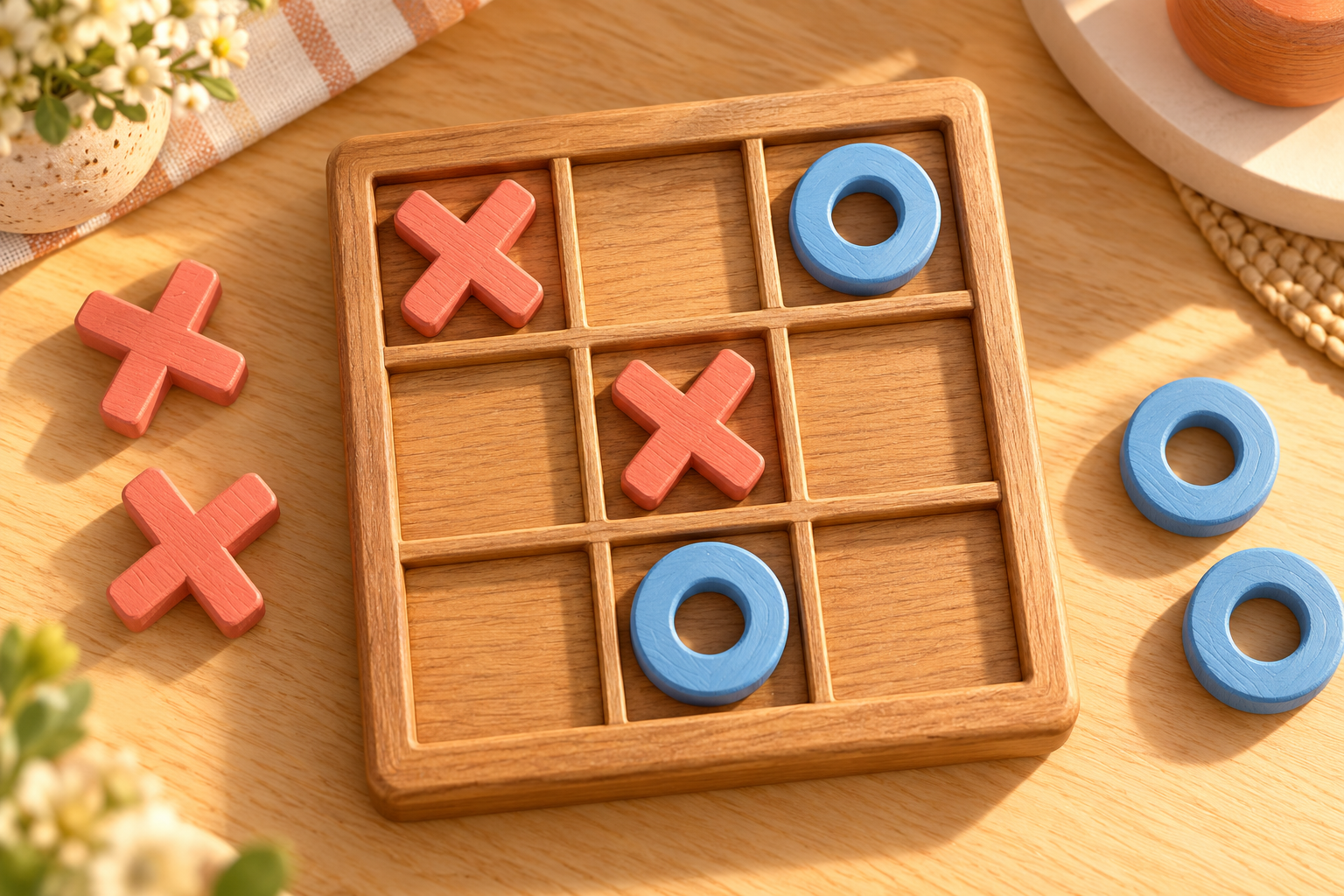
In the illustrated position X occupies A1 and B2, while O occupies C1 and B3. Both players have moved twice. X can win by taking C3. Count the marks before analysing a position: a diagram is useful only when its turn and move history make sense.
Legal moves and common mistakes
A move places your current mark in exactly one empty square. You cannot move an earlier mark, replace the other player's mark, play twice or erase a square. The browser ignores an occupied cell, a second click during the computer's response and any move after a result. These protections keep a quick double tap from becoming two turns.
A promising-looking shape is not always a threat. A threat means that there is a specific empty square which would complete a line on the next move. For example, X at A1 and B1 threatens C1 only when C1 is empty. If O already occupies C1, that row is closed to X. Looking at the empty end of each line is more reliable than counting marks anywhere on the board.
For a paper match agree on the starting side before drawing the first mark. If someone marks the wrong empty square, decide whether the mark stands or whether a replay is allowed. The browser provides no undo button for this game: a chosen square stays occupied until New match.
Winning, drawing and stopping
A line of three ends the match immediately. The winning cells are highlighted so both players can identify the result. A player does not need to fill all nine cells or create two lines. Sometimes the final mark completes two lines at once; this is one victory, not two turns or extra points.
A draw occurs when all nine squares are filled and neither mark has a line. It is a proper result, not a malfunction. Against careful defence you may need to concentrate on avoiding a loss rather than expecting every match to produce a winner. The strong computer searches complete continuations; it is designed to defend without losing on this 3×3 board. Easy and Medium deliberately allow more opportunities.
Use New match to clear the board. Changing the opponent, level or starting mark also starts a fresh match and cancels a pending computer reply. If two friends share a device, alternate who starts across a series of games rather than treating the starting control as an extra move during a match.
Three positions to read
Finish before defending. The first diagram has X at A1 and B2, and O at C1 and B3. X to move wins at C3. Although O has two marks too, X should check its own immediate victory first. A finished game has no later reply to fear.
Block a row. Imagine X at A1 and B1, and O at B2. It is O's turn. C1 is the square that stops X completing the top row. Choosing A3 because it looks spacious would leave an immediate loss. The question is not where O would like to build eventually, but what X can finish next.
Build a fork. Start with X at A1 and C3 and O at B2 and B1. X can choose A3, creating threats at A2 and B3. O can occupy only one of those two squares. This is a fork: two different winning moves are available after one placement. A fork is stronger than two marks in a single row because a single block cannot cover both ends.
Try naming the threatened square out loud before you move. If you cannot name it, recheck the line instead of assuming a pair of marks is dangerous.
A plan for your next move
Use a short priority order: win now, block an immediate loss, create a fork, prevent a fork, then choose a useful square. This order explains why automatically choosing the centre can be wrong later in a match: an immediate threat deserves attention first.
To find a fork, mentally place your mark in a candidate square and count the different empty squares where you could win next. Two separate lines must have two different winning ends. If both lines need the same empty square, the opponent can stop both with one move, so you have not found a true fork.
To defend, inspect the opponent's next placement as well as your own. Sometimes creating a threat forces a defensive reply and prevents the fork from being made. Avoid treating a memorised opening as a promise: the useful skill is reading the current board after every response.
For beginners, start on Easy and practise identifying lines. Move to Medium when you reliably notice one-move threats. Try Hard when a draw feels like a satisfying defence. These level names describe the computer's decisions, not a measured human rating.
Paper play and home variations
You need only a pencil and a nine-square board for a paper match. Use the same rule that a mark stays where it was placed. Keep finished boards so you can compare the move that changed the result. For a small series, give one point for a win and half a point to each side for a draw, then alternate the starter.
A teaching variation is to pause before each turn and ask both players to name every immediate winning square. Another is to replay a completed match until the losing player finds a different defence. These are conversation rules for a paper activity; the browser does not automatically enforce a coaching pause or retain the earlier board.
Larger boards and five-in-a-row are different games. So is the version where each side owns only three pieces and later moves them. The Kiduverse page uses ordinary placement on 3×3. Do not apply moving-piece or larger-board rules to the illustrated examples here.
An independent challenge
Read the challenge board without clicking first. X occupies A1 and B1. O occupies B2. O is to move. Which square prevents a loss on the next turn? Name the row and explain why the answer stops X.
Then make a fresh paper position with two Xs and one O, with O to move, where a different line needs blocking. Choose a column or a diagonal instead of copying the top row. Check that the proposed winning square is empty and that neither side has already won. This second position shows whether you can transfer the idea to a new board.
Open the game on Medium and use the same check before each move. After the result, point to one move where you either blocked a specific threat or missed one. The answer to the first challenge is C1: it occupies the last open square in X's top-row line. There can be other useful-looking choices, but they do not stop that immediate loss.
Playing in the browser
Choose a mode, computer level and first mark above the board. A changed setting starts a new match. The computer waits briefly before responding so the turn is visible. You can restart during that wait; the old response is cancelled. In Two players here, both players use the same device and take turns rather than joining a remote room.
On a phone, tap an empty square. On a keyboard, Tab reaches cells and controls, arrow keys move around the board, and Enter or Space places a mark. Accessible square names include the coordinate and the visible mark. A result is announced in the status area, and the winning line stays visible until a restart.
Playing requires JavaScript. This article, its diagrams and the rules remain readable without it. No sign-up, installation or game account is required. The game does not save a match when you leave or reload the page. For another line-building game, try four in a row; remember that its counters fall, so a free square is not always reachable.
Open the game →Frequently asked questions
Can two people play on one device?
Yes. Choose Two players here and take turns on the same board. This mode does not create a remote room.
Which marks and board size are used?
X and O play on a 3×3 board. The First move selector can let either mark start a new match.
How do I win tic-tac-toe?
Place three of your marks in one uninterrupted row, column or long diagonal. A filled board without a line is a draw.
Can I beat the Hard computer?
Hard searches complete continuations and defends without losing on the 3×3 board. A draw is a successful result against that level.
What is a fork?
A move creating two different immediate winning squares for your next turn. One opponent placement cannot normally block both.
Can I move or undo a mark?
No. A placed mark stays until New match. Restart or a changed setting clears the board.
What happens if I restart during a computer turn?
The pending reply is cancelled. A new board starts with the selected first mark.
Is an account required?
No. Play is free without registration. JavaScript is needed for the match, and the guide is readable without it.